
Let's be honest: the reason most people quit tracking their food isn't that they don't understand nutrition. It's that logging meals is annoying.
Opening an app, searching for "grilled chicken breast," scrolling past seventeen options that are all slightly different, manually entering the weight, then doing it again for the rice, the broccoli, the olive oil you cooked with — it adds up. What should take ten seconds becomes three minutes per meal, nine minutes per day, and an hour per week of staring at your phone and typing food names.
No wonder most people abandon food tracking within two weeks.
But here's the thing: food logging in 2026 looks nothing like food logging in 2016. The technology has caught up to the problem. You can now log meals without typing a single character — using barcode scanners, AI-powered cameras, and photo recognition that does the work for you.
The question isn't whether to track anymore. It's how to track in a way that actually fits your life. Let's compare every method. If you still need targets to log against, pair this with how to track macros (beginner's guide) or what should my macros be?.
Method 1: Manual Search
How it works: You open your app, type the name of a food, scroll through a database, select the right match, and enter the serving size.
Time per meal: 2–5 minutes (depending on meal complexity)
This is the OG method, and it's still the default in most apps. It works, but it's the slowest option by a wide margin.
Where Manual Search Works
- Simple, single-ingredient foods. Logging "1 medium banana" or "2 eggs" is quick because there's usually an obvious database match.
- When you need precision. For specific recipes or unusual ingredients, manual search gives you the most control over what gets logged.
- Homemade meals with specific recipes. If you made a dish from scratch and know every ingredient, you can build it item by item for maximum accuracy.
Where It Falls Apart
- Multi-ingredient meals. That stir-fry you made for dinner has chicken, broccoli, bell peppers, soy sauce, sesame oil, rice, and garlic. Logging each one individually takes forever.
- Restaurant and takeout food. Good luck finding "the chicken sandwich from that Thai place down the street" in a generic database.
- Database inconsistency. Many apps rely on user-submitted entries, which means you'll find five different entries for "chicken breast" with wildly different calorie counts. Which one is right? Who knows.
- Friction kills consistency. Even two extra minutes per meal is enough to make people skip logging. And skipped meals compound — before you know it, you haven't tracked in a week.
Accuracy: 7/10 (high when done carefully, but most people cut corners) Speed: 3/10 Convenience: 3/10
Method 2: Barcode Scanning
How it works: You point your phone's camera at a food package's barcode. The app instantly identifies the product and auto-fills all the nutrition data.
Time per item: 3–5 seconds
Barcode scanning was the first major leap in food logging speed, and it's still one of the most reliable methods for packaged foods.
Where Barcode Scanning Works
- Packaged foods. Anything with a UPC code — granola bars, yogurt containers, canned goods, frozen meals, drinks, snack bags — scans in seconds.
- Protein bars and shakes. The exact product shows up with manufacturer-verified nutrition info. No guessing.
- Grocery staples. Milk, bread, cereal, chips, pasta sauce — if it comes in a package, it scans.
Where It Falls Apart
- Fresh foods. That chicken breast from the butcher counter doesn't have a barcode. Neither does the apple from the farmers' market, the rice you scooped from a bag, or anything you cooked yourself.
- Restaurant food. No barcode, no dice.
- Bulk items. If you buy oats, nuts, or spices from bulk bins, there's nothing to scan.
- International products. Some imported foods have barcodes that aren't in US/European databases.
Barcode scanning is incredibly efficient for its use case, but it only covers about 30–40% of what most people eat in a day. You need other methods for the rest.
Accuracy: 9/10 (data comes directly from manufacturer labels) Speed: 9/10 (for packaged items) Convenience: 8/10 (limited to packaged foods)
Method 3: AI Camera Recognition
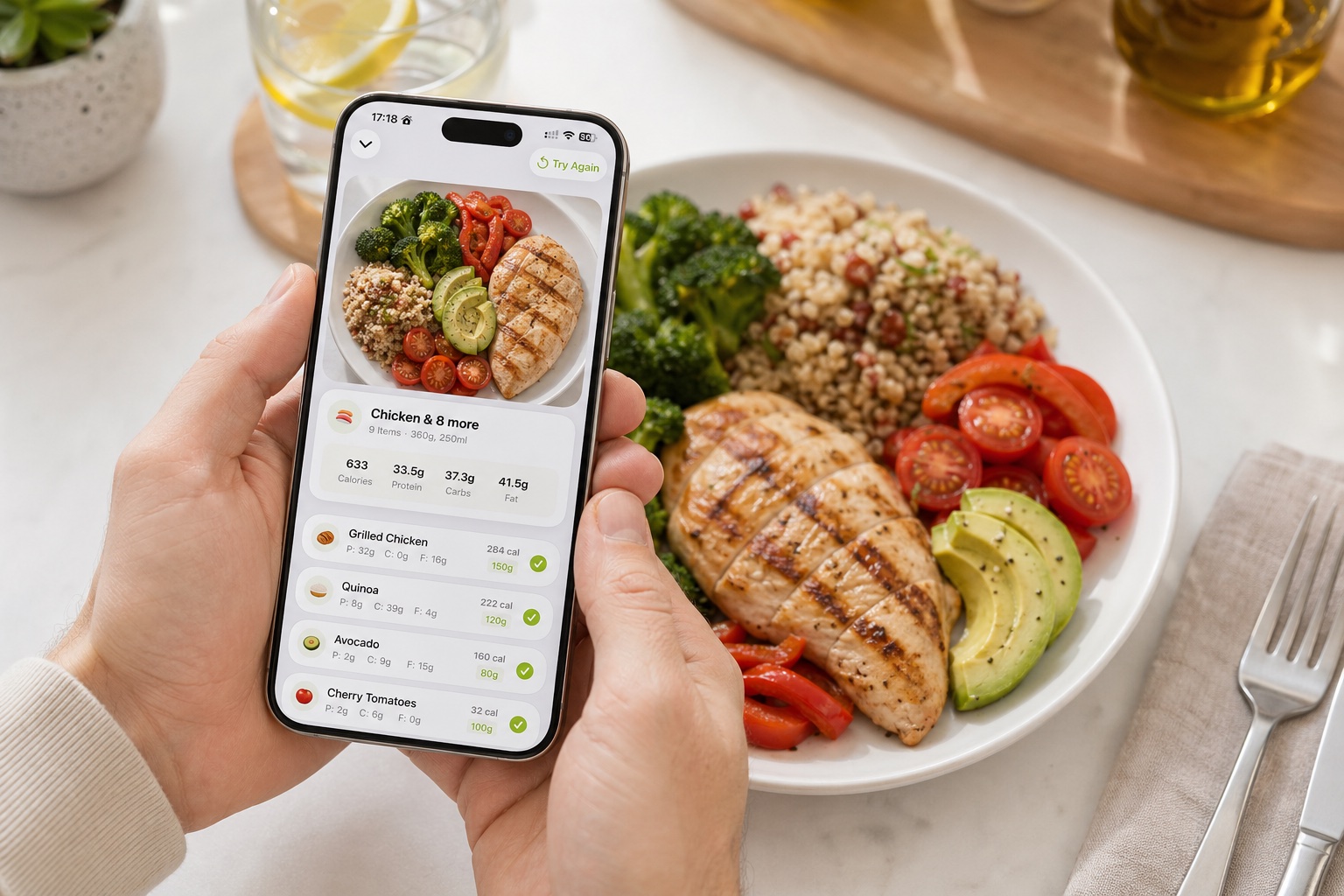
How it works: You point your camera at your plate of food — no barcode needed. AI identifies what's on the plate, estimates portions, and logs the nutritional information automatically.
Time per meal: 5–10 seconds
This is the method that's changed the game. Instead of searching, scanning, or typing, you just... show the app your food. Computer vision models trained on millions of food images identify individual items on your plate, estimate serving sizes based on visual cues, and calculate macros.
Where AI Camera Recognition Works
- Home-cooked meals. Point the camera at your plate of grilled chicken, sweet potato, and salad. The AI identifies each component and estimates the portions.
- Restaurant meals. Take a quick photo before you eat. The AI recognizes common dishes — pastas, salads, sandwiches, rice bowls — and provides reasonable estimates.
- Multi-component meals. Instead of logging each ingredient separately, the camera captures the whole meal at once. What would take 3–5 minutes to log manually takes seconds.
- When speed matters most. At a work lunch, on a date, or eating on the go, pulling out a kitchen scale isn't an option. A quick photo is discreet and fast.
Where It Has Limitations
- Accuracy isn't perfect. AI estimation is good, but it's not as precise as weighing food on a scale. Portion estimates can be off by 10–20%, especially for calorie-dense foods like nuts, oils, and cheese where small volume differences mean big calorie differences.
- Hidden ingredients. The AI can see what's on top of your plate, but it can't detect the butter your pasta was tossed in or the sugar in a sauce. What you see isn't always what you get.
- Unusual or mixed dishes. A casserole, curry, or stew where ingredients are blended together is harder for AI to parse than a plate with visually distinct items.
- Portion ambiguity. Two plates of rice can look similar in a photo but differ by 100+ calories depending on how tightly the rice is packed.
Despite these limitations, AI camera logging represents the best trade-off between speed and accuracy for most meals. It gets you within 80–90% accuracy in under 10 seconds. For the vast majority of tracking goals, that's more than good enough.
Accuracy: 7/10 (good estimates, not perfect) Speed: 10/10 Convenience: 10/10
Method 4: Photo Logging (With Later Analysis)
How it works: You snap a photo of each meal as you eat it. The app (or you) reviews the photos later to log the nutrition data. Some apps use AI to analyze the photos automatically; others store the photos as a visual food diary for manual review.
Time per meal (at the moment): 2 seconds Time for review: Varies
Photo logging comes in two flavors:
AI-assisted photo logging works like camera recognition, but asynchronously. You take photos throughout the day, and the AI processes them in the background. By the end of the day, your food diary is populated.
Visual food diary is more of an awareness tool. You photograph everything you eat, and the photos themselves serve as a record. No calorie counting — just visual accountability.
Where Photo Logging Works
- Busy schedules. If you don't have time to log in real-time, snapping a photo takes two seconds. Review later when you have a moment.
- Mindfulness-based approaches. The act of photographing your food makes you more aware of what and how much you're eating, even without counting numbers.
- Building a habit. If full macro tracking feels overwhelming, photo logging is a low-friction entry point.
Where It Falls Apart
- Delayed feedback. If you're trying to hit specific macro targets, knowing at 8 PM that you under-ate protein at lunch isn't helpful. Real-time tracking lets you adjust throughout the day.
- Easy to forget. You're more likely to forget to review photos at the end of the day than to log in the moment.
- Accuracy depends on review quality. A photo alone doesn't tell you the exact weight of the chicken on your plate. The accuracy is only as good as the analysis that follows.
Accuracy: 5–8/10 (depends on whether AI analysis is applied) Speed: 10/10 (at the moment of eating) Convenience: 9/10
Head-to-Head Comparison
| Method | Time Per Meal | Accuracy | Works For | Best Use Case |
|---|---|---|---|---|
| Manual search | 2–5 min | 7/10 | Everything (slowly) | Specific recipes, unusual foods |
| Barcode scanning | 3–5 sec | 9/10 | Packaged foods only | Groceries, snacks, supplements |
| AI camera | 5–10 sec | 7/10 | Anything visible | Home meals, restaurants, mixed plates |
| Photo logging | 2 sec + review | 5–8/10 | Anything visible | Busy schedules, building awareness |
The Smart Approach: Use the Right Tool for the Job
Here's what experienced trackers figure out: you don't pick one method and use it exclusively. You use different methods for different situations.
Morning routine at home with packaged foods? Barcode scan the yogurt, the granola, the milk.
Lunch at a restaurant? AI camera. Point, shoot, done.
Cooking dinner from a recipe? Manual search for the individual ingredients if you want precision, or camera scan the finished plate if you want speed.
Eating on the go? Photo log now, let AI analyze later.
The most effective food tracking setup supports all of these methods in one place, so you always have the fastest option available regardless of what you're eating or where you are. You pick the method that fits the moment, rather than forcing every meal through the same slow process.
Making Any Method More Efficient
Regardless of which method you use most, these habits reduce logging time dramatically:
Save Frequent Meals
If you eat the same breakfast 5 days a week, log it once and save it as a "frequent meal" or "favorite." One tap to log instead of scanning or searching each item.
Use Meal Templates
If your meals follow a similar structure (protein + carb + vegetable), create templates. Swap out the specific items but keep the structure. It's faster than building each meal from scratch.
Log in Real-Time, Not Later
Don't Chase Perfection
Pre-Log When Possible
Know what you're having for lunch? Log it in the morning. This takes the decision-making and logging out of the busy parts of your day, and it helps you plan your remaining macros around what's already been committed.
The Real Barrier to Food Tracking (And How to Overcome It)
The biggest reason people quit food tracking isn't accuracy concerns or nutrition confusion. It's friction.
Every extra tap, every search that returns the wrong result, every manual entry that takes too long — it accumulates into a feeling of "this isn't worth the effort." And once that feeling takes hold, most people stop tracking within days.
The solution isn't discipline. It's reducing friction until tracking feels almost effortless. That means:
- Using the fastest logging method available for each meal
- Saving and reusing frequent meals
- Not obsessing over gram-level precision
- Choosing a tool that supports multiple input methods
When logging a meal takes less time than posting an Instagram story, consistency stops being a willpower challenge and becomes automatic behavior. That's where the real results come from — not from any single day of perfect tracking, but from the compounding effect of logging consistently over weeks and months.
Your Action Plan
- Audit your current method. How long does it take you to log a typical meal? If it's more than 30 seconds, there's room to improve.
- Use barcode scanning for everything that comes in a package.
- Use AI camera recognition for home-cooked meals and restaurant food.
- Save your frequent meals so repeat breakfasts and lunches become one-tap entries.
- Log in real-time — don't batch it at the end of the day.
- Give yourself a two-week trial. Use the fastest methods available and see if tracking finally sticks.
The technology exists to make food logging nearly invisible in your daily routine. The gap between "I should track my food" and "I actually track my food" is no longer a time problem. It's just a matter of using the right tools.
Log any meal in under 10 seconds with camera, barcode, or photo — no typing, no searching.
Try Nour Free