
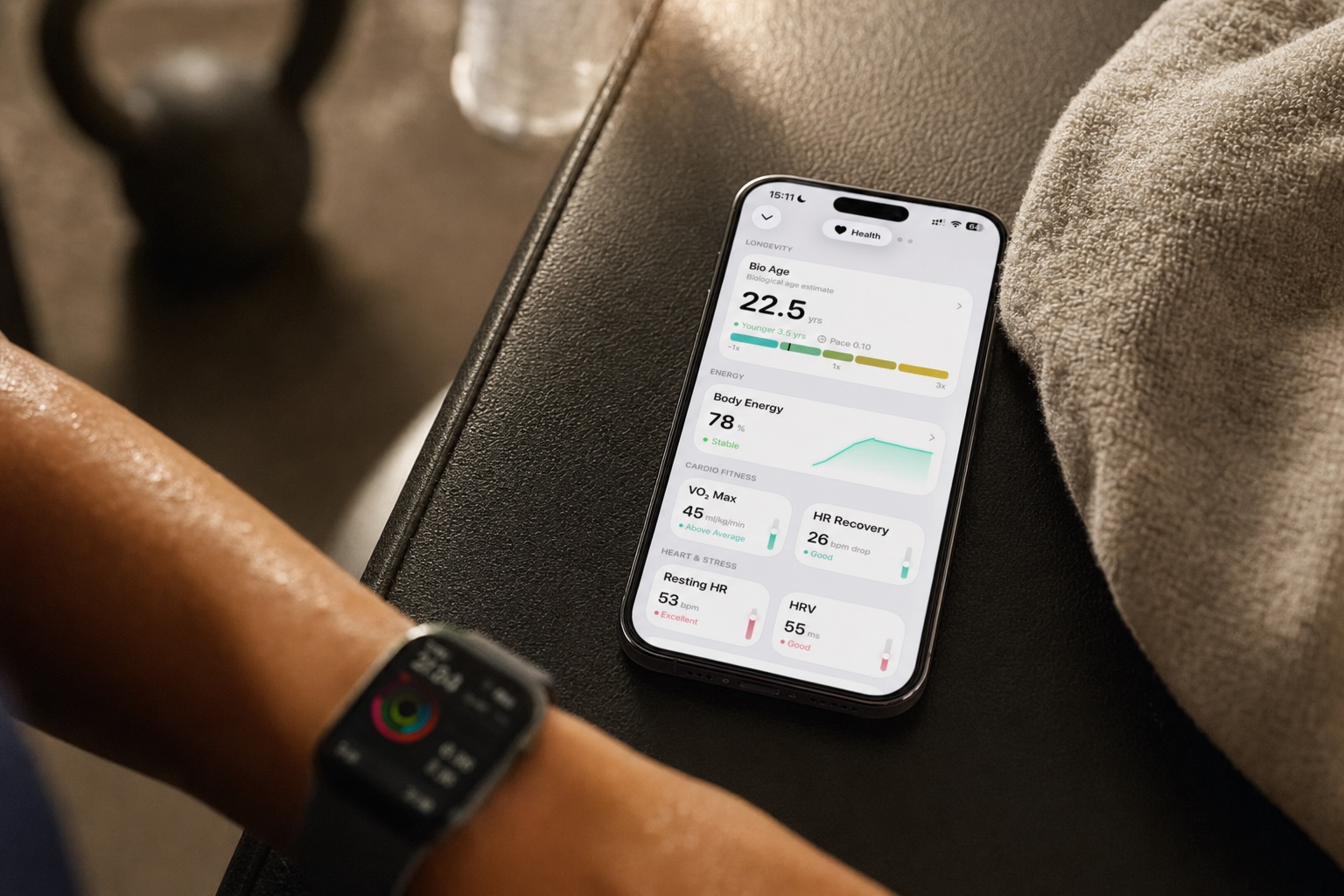
Your Apple Watch is quietly building one of the most comprehensive health profiles that's ever existed for a consumer device. Every second it sits on your wrist, it's measuring, sampling, and recording data about your cardiovascular system, nervous system, sleep patterns, respiratory function, and more.
The question isn't whether it's collecting useful data. It is. The question is whether you know what that data actually means — and whether you're doing anything with it.
This is a deep dive into every health metric your Apple Watch tracks that's relevant to fitness and recovery. Not just what each number represents, but what it means for your training, where people commonly misinterpret it, and how to turn raw data into smarter decisions about your body. For a dedicated explanation of heart rate variability (HRV) and how to interpret it for training, read what is HRV?.
Heart Rate: The Foundation
Your Apple Watch uses photoplethysmography (PPG) — green LED lights that detect blood flow changes under your skin — to measure heart rate. It samples this data constantly when you're wearing the Watch, recording both continuous measurements during workouts and periodic measurements throughout the day.
What It Tells You About Recovery
Heart rate during exercise tells you about effort. Heart rate at rest tells you about recovery and fitness.
During workouts: Monitoring heart rate during training helps you stay in target zones. For zone 2 training (the aerobic base-building work that's become popular), keeping your heart rate in the 60–70% of max range is the entire point. For HIIT, seeing your heart rate spike and recover between intervals confirms you're getting the intended training stimulus.
Heart rate recovery (HRR): This is one of the most underused metrics. After intense exercise, how quickly does your heart rate drop? A drop of 12+ beats per minute in the first minute after stopping is considered normal. Greater than 20 beats indicates strong cardiovascular fitness. Less than 12 may indicate poor fitness or overtraining.
Resting Heart Rate (RHR)
Your Watch measures resting heart rate during periods of inactivity and sleep. This is one of the simplest and most reliable indicators of both fitness level and acute recovery status.
What's Normal?
Average adult RHR is 60–100 bpm. Athletes and well-trained individuals often range from 40–60 bpm. Elite endurance athletes can be in the 30s.
What It Tells You About Recovery
Long-term trend: As cardiovascular fitness improves, RHR typically decreases. If you start training consistently and your RHR drops from 72 to 65 over three months, that's a meaningful adaptation. Your heart is getting stronger and more efficient.
Short-term spikes: An RHR that jumps 5–10 beats above your personal baseline is a warning signal. Common causes:
- Accumulated training fatigue. You've been pushing hard for several days without adequate recovery.
- Illness onset. Often detectable 1–2 days before symptoms appear.
- Alcohol consumption. Even moderate drinking can elevate RHR for 24–48 hours.
- Stress. Emotional and psychological stress elevate RHR just as reliably as physical stress.
- Dehydration. Your heart has to work harder when blood volume is reduced.
Common Misinterpretation
"My RHR was 5 beats higher this morning, so I must be overtraining."
Not necessarily. A single elevated reading means very little. What matters is the trend. Two or three days of elevated RHR is a pattern worth responding to. One reading could be caffeine timing, hydration, or sleeping position. Don't make training decisions based on one data point.
Heart Rate Variability (HRV)
HRV is the time variation between consecutive heartbeats, measured in milliseconds. It's controlled by your autonomic nervous system — specifically the balance between your sympathetic (fight-or-flight) and parasympathetic (rest-and-digest) branches.
Why It Matters for Fitness
Higher HRV generally indicates that your nervous system is flexible and well-recovered — it can ramp up and down efficiently. Lower HRV suggests your system is under stress and has less capacity to handle additional load.
Your Apple Watch measures HRV using the SDNN metric (standard deviation of the normal-to-normal heartbeat intervals) during sleep and periodically throughout the day.
How to Read Your HRV Data
Your baseline is personal. HRV varies enormously between individuals. A 25-year-old endurance athlete might have a baseline HRV of 80–100ms. A 50-year-old who recently started exercising might have a baseline of 25–35ms. Neither number is inherently good or bad — what matters is your trend relative to your own baseline.
Morning measurement is most reliable. HRV fluctuates dramatically throughout the day based on activity, meals, stress, and posture. Overnight and first-thing-in-the-morning measurements are the most stable and comparable day to day.
Look at 7-day rolling averages. Day-to-day HRV variation is normal and expected. A single low reading might mean you had a weird dream, digested a heavy meal, or rolled onto your arm. A sustained downtrend (3–5+ days below your average) is a meaningful signal.
What It Tells You About Recovery
HRV trending up or stable at baseline: Your body is handling your current training load well. You can maintain or increase intensity.
HRV trending down for 3+ days: Your body is accumulating stress faster than it's recovering. This could be from training, but also from work stress, poor sleep, caloric restriction, or illness. Consider reducing training volume or intensity, improving sleep, and ensuring adequate nutrition.
HRV crashes (30%+ below baseline): Something significant is going on. You might be getting sick, severely sleep-deprived, or deeply overtrained. This is a "take a rest day" signal.
Common Misinterpretations
"My HRV is lower than my friend's, so I'm less fit." No. HRV is highly individual and influenced by age, genetics, and fitness history. Compare yourself to your own baseline, never to someone else's numbers.
"My HRV spiked really high after a rest day, so rest days are the answer." Sometimes. But very high HRV readings can occasionally indicate parasympathetic overdrive — which itself can be a sign of extreme fatigue. Context matters. If you've been heavily overtraining and suddenly your HRV spikes on a rest day, your nervous system might be in a state of deep recovery, not celebration.
"I should check my HRV constantly throughout the day." Daytime HRV readings are so variable as to be nearly useless for recovery assessment. Check your overnight average or first-thing-in-the-morning reading. That's it.
Blood Oxygen (SpO2)
The Apple Watch uses red and infrared light to measure blood oxygen saturation — the percentage of hemoglobin carrying oxygen. It measures this periodically throughout the day and during sleep.
What's Normal?
95–100% is normal at sea level. Readings consistently below 95% warrant medical attention.
Fitness Relevance
Sleep apnea detection: Frequent SpO2 dips below 90% during sleep can indicate obstructive sleep apnea — a condition that severely impairs recovery, elevates cardiovascular risk, and is surprisingly common in strength athletes and people with higher body mass (including muscular individuals). If your Watch shows repeated nighttime dips, talk to a doctor about a sleep study.
Altitude training: If you train at altitude or use an altitude mask, SpO2 gives you real-time feedback on oxygen saturation. Not relevant for most people, but valuable for endurance athletes incorporating altitude protocols.
Illness detection: A drop in SpO2 can be an early indicator of respiratory illness, sometimes before other symptoms manifest.
Limitation
The Watch's SpO2 sensor is less reliable than medical pulse oximeters. Wrist position, skin tone, tattoos, and movement can all affect readings. Use it for trend detection, not clinical diagnosis.
Sleep Stages
Modern Apple Watch models track sleep stages: REM (rapid eye movement), Core (light sleep), Deep sleep, and Awake periods. This is done through a combination of accelerometer data (movement), heart rate patterns, and respiratory rate analysis.
What Each Stage Does
Deep Sleep (Slow-Wave Sleep): Physical recovery headquarters. This is when growth hormone is released, muscle tissue is repaired, and the immune system is bolstered. Athletes need adequate deep sleep for physical adaptation. Deep sleep typically constitutes 15–25% of total sleep for healthy adults, with a higher percentage in younger people.
REM Sleep: Cognitive recovery and motor learning. REM is when your brain consolidates motor patterns — important for anyone learning new exercises, skills, or sports movements. REM typically makes up 20–25% of total sleep and is concentrated in the later hours of sleep (another reason cutting sleep short by waking early is harmful).
Core (Light) Sleep: Transition and maintenance sleep. Not as restorative as deep or REM individually, but makes up the bulk of your sleep (40–55%) and plays a role in memory consolidation and metabolic regulation.
What to Optimize
Total sleep time: This comes first. No amount of sleep quality optimization compensates for insufficient duration. For active adults, 7–9 hours is the standard recommendation. Most people training hard do better at the upper end.
Deep sleep percentage: If your deep sleep percentage is consistently below 10%, consider these factors:
- Alcohol suppresses deep sleep even in small amounts
- Late caffeine consumption (within 8–10 hours of bedtime)
- Elevated body temperature from training too close to bedtime
- Blue light exposure in the hour before sleep
- Inconsistent sleep schedule
Sleep consistency: Your Watch tracks what time you go to bed and wake up. Large variations (1.5+ hours) between weekdays and weekends — "social jet lag" — degrade sleep quality even when total hours are adequate. Your circadian rhythm rewards consistency.
Common Misinterpretation
"I only got 45 minutes of deep sleep last night, something is wrong." Consumer wrist-based sleep staging is an estimate, not a medical measurement. The accuracy is reasonable for trends but imprecise for individual nights. One night of low deep sleep isn't a crisis. A sustained pattern over weeks might be worth addressing.
Respiratory Rate
Your Apple Watch estimates respiratory rate during sleep by analyzing subtle accelerometer patterns (chest movement) and heart rate variability patterns that correlate with breathing.
What It Tells You
Normal adult respiratory rate during sleep is 12–20 breaths per minute. It's a stable metric that doesn't change much day to day in healthy individuals.
Elevated respiratory rate (above your personal baseline) can indicate:
- Onset of respiratory illness
- Sleep-disordered breathing
- Cardiovascular stress
- Fever
It's a subtle but reliable early warning signal. By itself it doesn't tell you much, but combined with elevated RHR and depressed HRV, it strengthens the case that something is off.
Wrist Temperature
Available on Apple Watch Series 8 and later, wrist temperature tracking measures overnight temperature changes relative to your personal 5-night baseline.
Recovery Relevance
Cycle tracking: For menstruating athletes, temperature shifts throughout the menstrual cycle can inform training programming. The luteal phase (post-ovulation, higher temperature) is associated with slightly reduced exercise capacity for some individuals, while the follicular phase (post-menstruation, lower temperature) may be more conducive to high-intensity training.
Putting It All Together: The Multi-Metric Picture
No single metric tells the full recovery story. The power is in combining them:
| Signal | RHR | HRV | Sleep Quality | Temperature | Interpretation |
|---|---|---|---|---|---|
| All Clear | Normal | At/above baseline | 7+ hours, good stages | Baseline | Ready for high intensity |
| Caution | Slightly elevated | Slightly below | 6–7 hours | Baseline | Moderate intensity, monitor |
| Warning | Elevated 5+ bpm | Down 20%+ for 3+ days | Under 6 hours | Elevated | Rest or very light activity |
| Red Flag | Significantly elevated | Crashed | Poor for multiple nights | Spike | Complete rest, possible illness |
The challenge is that doing this analysis manually every morning — checking five different screens in Apple Health, comparing each to your rolling averages, and synthesizing a training recommendation — is tedious and error-prone. Which is why most people don't do it.
Making Raw Data Actionable
You have three approaches:
1. The DIY Approach
Learn to read your own data using the framework above. Check your Health app each morning, track trends mentally or in a spreadsheet, and make training decisions accordingly. This works if you're genuinely disciplined and interested in the data. Most people maintain this habit for about two weeks.
2. Simple Third-Party Recovery Apps
Apps like Athlytic or Training Today can read your Apple Health data and generate a basic recovery score. These are better than nothing — they save you from manually checking each metric — but they typically only use Watch data. They don't know about your training load, nutrition, or program design.
3. Integrated Systems
This is where platforms that combine Watch data with training and nutrition context can add genuine value. Nour's Recovery Index, for example, doesn't just look at your HRV and sleep — it cross-references those metrics against your recent training volume, muscle group fatigue, calorie intake, and macro balance. The result is a recovery score that's contextualized to your entire fitness picture, not just your biometric data in isolation.
This matters because recovery isn't just a function of sleep and heart rate. Two people with identical Watch metrics can have very different recovery needs if one of them just did heavy deadlifts and the other did a light yoga session. An integrated system knows the difference.
The other advantage is that Nour works with or without an Apple Watch. Not everyone wears one, and the Recovery Index can still provide useful guidance based on training history, nutrition, and self-reported data. The Watch data enriches it, but isn't required.
What Your Watch Can't Tell You
It's worth being honest about the limitations:
It can't assess muscle damage or soreness. The Watch knows about your cardiovascular recovery but not about the specific state of your quadriceps after yesterday's leg day. Muscle recovery tracking requires either subjective input (how sore are you?) or algorithms that estimate it based on training volume and exercise selection.
It can't measure strength or performance readiness. A "recovered" nervous system (good HRV) doesn't necessarily mean your bench press will feel great today. Performance depends on many factors the Watch can't measure: glycogen status, neural readiness, joint health, and motivation.
It can't replace medical testing. Elevated RHR, depressed HRV, and low blood oxygen are useful signals, but they're not diagnoses. If you see persistent abnormalities, see a doctor. The Watch is a screening tool, not a diagnostic one.
Accuracy has limits. Wrist-based optical sensors are inherently less accurate than chest straps (for heart rate) or medical equipment (for SpO2 and HRV). The data is good enough for trend tracking and daily decision-making. It's not precise enough for research-grade analysis.
The Key Takeaway
Your Apple Watch is already tracking everything it needs to give you a meaningful recovery picture. The hardware is doing its job. The gap is in the software — specifically, in turning those raw data streams into simple, actionable guidance.
Your Apple Watch knows more about your body than you realize. The question is whether that knowledge is sitting in a database or actually shaping how you train, eat, and recover.
Make the data work for you.
Combine your Apple Watch metrics with training and nutrition data for a single daily Recovery Index score.
Try Nour Free